FreePPP 1.05 Setup: Difference between revisions
Jump to navigation
Jump to search
No edit summary |
m Removed protection from "FreePPP 1.05 Setup" |
(No difference)
| |
Revision as of 12:04, 13 December 2012
- Open your Apple menu, go to , and select .
- Set the to which port your modem is on.
- should be set to None.
- should be set to Off.
- Check , and .
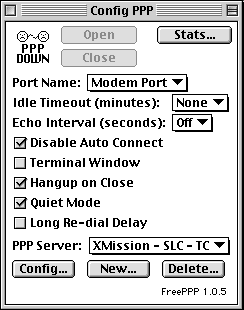
- Click on .
- Enter XMission into the field.
- should be set to CTS & RTS (DTR) unless you have a Global Village Modem, then it should be set to CTS Only.
- Enter your local XMission dial-up number in the field.
- Set to 90 seconds.
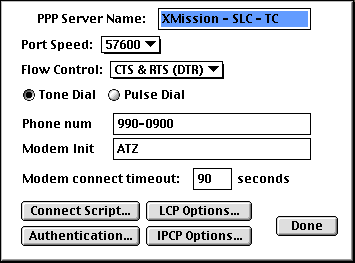
- Click on .
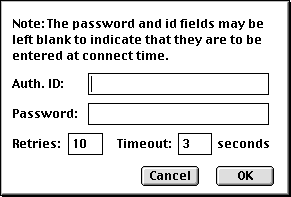
- Enter your XMission username in the field
- Enter your XMission password in the field.
- should at least be set to 1 and the should be set to 3 seconds.
- Click on .
- Click on .
- Click on .
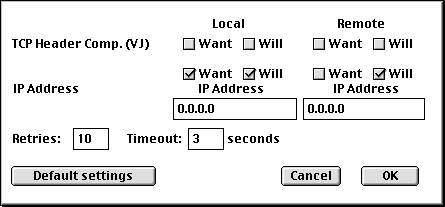
- Check all boxes next to and .
- Check and under the column next to .
- Click on .
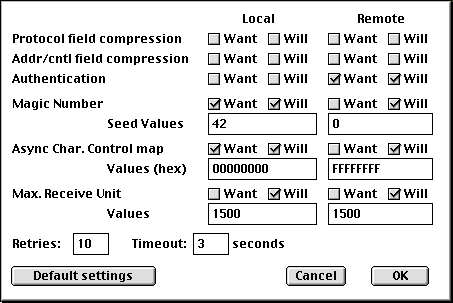
- Click on .
- Click on .
- Uncheck all boxes next to .
- Click on .
- Click on .


