Ten Digit Dialing: Difference between revisions
Jump to navigation
Jump to search
remove test |
No edit summary |
||
| (5 intermediate revisions by one other user not shown) | |||
| Line 1: | Line 1: | ||
Effective March 1st, 2009, you must include the area code when dialing local numbers. This will impact customers using dial-up which is why we have provided simple instructions below for how to make this change to your existing dial-up connection. | Effective March 1st, 2009, you must include the area code when dialing local numbers. This will impact customers using dial-up which is why we have provided simple instructions below for how to make this change to your existing dial-up connection. For details, view the [[Ten Digit Dialing Announcement]]. | ||
For a list of all XMission Dial-up numbers, please visit [http://xmission.com/about/dialup/ XMission Dial-up Numbers] | For a list of all XMission Dial-up numbers, please visit [http://xmission.com/about/dialup/ XMission Dial-up Numbers] | ||
| Line 17: | Line 17: | ||
#In the "Telephone Number" field, change the number to reflect your area code before the number you currently dial to connect to XMission, then click the "Apply" button. | #In the "Telephone Number" field, change the number to reflect your area code before the number you currently dial to connect to XMission, then click the "Apply" button. | ||
#[[Image:Osx10digit.png]] | #[[Image:Osx10digit.png]] | ||
[[Category:Dialup Troubleshooting|10 Digit Dialing]] | |||
[[Category:Dialup]] | |||
Latest revision as of 11:42, 16 January 2014
Effective March 1st, 2009, you must include the area code when dialing local numbers. This will impact customers using dial-up which is why we have provided simple instructions below for how to make this change to your existing dial-up connection. For details, view the Ten Digit Dialing Announcement.
For a list of all XMission Dial-up numbers, please visit XMission Dial-up Numbers
Windows Vista & XP
- Click on your XMission Dialup Connection shortcut.
- In the "Dial" field, change the number to include your area code before the number you currently dial to connect to XMission, then click the "Dial" button.
- When prompted to make the change permanent, click "Yes".


MacOSX
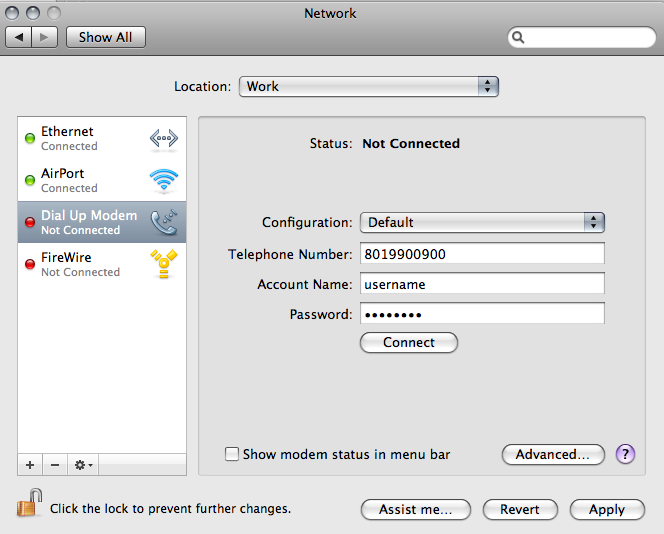
- From the Apple Menu select "Location" then "Network Preferences".
- Select your Dial-up Modem from the list on the left.
- In the "Telephone Number" field, change the number to reflect your area code before the number you currently dial to connect to XMission, then click the "Apply" button.